Your Advantage. Your Battlefield.

Battlefield 6 Cheats Gain the Tactical Edge

Battlefield 6 spreads 64 players across large maps with vehicles, long sightlines, and destructible cover. Player ESP, skeleton overlays, radar, and smoothed aim help you spot threats early—not just win close duels.

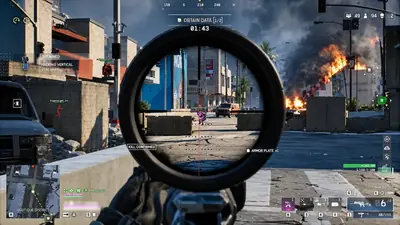
Sniper scope view in an urban district with purple player highlight, skeleton ESP, and distance tags.

64 players

Match scale

10 & 11

Windows

Cloud DMA

Delivery stack

24/7

Help desk

Aimbot
Player ESP
Skeleton ESP
Radar
Wallhack
No recoil
Stream-proof
Config profiles
Cloud DMA
HVCI ready
Live status
Windows 10 & 11
Battlefield 6 PC
Cloud DMA required
HVCI & Core Isolation
TPM & Secure Boot
Config profiles
External loader
Aimbot
Player ESP
Skeleton ESP
Radar
Wallhack
No recoil
Stream-proof
Config profiles
Cloud DMA
HVCI ready
Live status
Windows 10 & 11
Battlefield 6 PC
Cloud DMA required
HVCI & Core Isolation
TPM & Secure Boot
Config profiles
External loader

Features

Built for wide maps and mixed ranges

Battlefield 6 cheats focus on visibility first: boxes and names at distance, skeletons behind rubble, a wider radar, then aim smoothing when you engage.

Player ESP

Names, boxes, distance.

On a 64-player map, enemies appear far beyond what you can pick out by eye. Player ESP draws boxes, names, and distance readouts so a horizon scan becomes a target list. You set how far markers stay visible.

  • Box and name tags
  • Distance limit toggle
  • Health bar option
  • Separate from aim
  • Max distance control

Wallhack

Contacts through geometry.

Wallhack keeps the same ESP data visible when someone sits behind a wall or slab of rubble. On destructible maps, cover moves mid-round, so the overlay keeps updating instead of assuming static walls.

  • Works with ESP colors
  • Tracks moved cover
  • Own menu switch
  • Visible check pairing

Aimbot

Soft aim and bones.

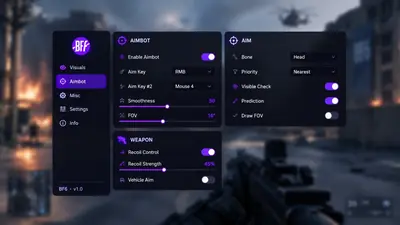
Engagement range in Battlefield swings from close quarters to long lanes. The aim tab picks head, neck, chest, or body, sets FOV, smoothing, and max distance so close fights stay sharp without snapping across the map.

  • Bone selection
  • Smoothing slider
  • FOV border
  • Distance cap
  • Visibility check

No recoil

Kick control layers.

Recoil layers sit apart from aim settings. Reduce kick partly for a natural look or more aggressively for burst fire at range. Tune per weapon profile in the config system.

  • Separate from aim tab
  • Partial or full reduction
  • Per-profile save
  • Toggle before matches

Skeleton ESP

Posture behind cover.

Prone, crouched, or half-covered players behind low rubble can mislead a box outline. Skeleton ESP draws bones so you read actual posture—useful for telling exposure from a tiny sliver of visibility.

  • Bone lines
  • Pairs with boxes
  • Low-wall fights
  • Toggle in visuals menu

Radar

Flanks the minimap misses.

The in-game minimap shows only part of the action. A wider radar overlay marks nearby threats on alternate routes—helpful when squads split across lanes and vehicles.

  • Overlay minimap
  • Wider radius
  • Threat dots
  • Pairs with ESP

Stream-proof

Hidden on capture.

Stream-proof mode hides menus and overlays from OBS, Streamlabs, and most capture tools while you play or record Battlefield 6.

  • OBS safe
  • Streamlabs safe
  • Menu hidden
  • Toggle in misc

Vehicle awareness

Listed combat feature.

The seller’s Battlefield 6 listing includes vehicle-related awareness among its combat features. Confirm the exact toggles in checkout delivery—do not assume air and ground ESP without verifying your build.

  • Seller lists Vehicle
  • Ground and air maps
  • Confirm in loader
  • After patches

Config profiles

Save and share.

Save, load, share, and delete configs from the menu. Bind hotkeys for aim, visuals, and radar so you can switch between infantry and long-range profiles without reopening every slider.

  • Save and load
  • Share configs
  • Hotkey binds
  • Read status after patches

Store

Our products

Compare the cheat menu and the utilities on this grid. Open a product page for the feature list and checkout.

HWID Spoofer for Battlefield 6 & Javelin PCs

Disk serials, MAC addresses, and GPU IDs get a new pass. The cleaner in the license runs before the next sign-in.

After a hardware flag, this license rewrites disk serials. It also rewrites MAC addresses, GPU IDs, and related fingerprints. Trace cleanup is in the same license.

  • Disk serial rewrite
  • MAC rewrite
  • GPU ID rewrite

Cloud DMA

A Hyper-V environment for one Windows PC with guided installation and encrypted activation.

Cloud DMA may require GREENWARD, Static Server and AWS as separate purchases. Check the full requirements and current price at checkout.

  • Single-PC setup
  • Guided Hyper-V installation
  • Encrypted activation

Client Skin Changer for Supported Titles

Weapon skins and outfits, drawn on this PC, without a separate purchase for each cosmetic.

A small client paints premium weapon skins on your screen. Outfits and knife variants are included, across the major titles it lists.

  • Weapon finish looks
  • Outfit looks
  • Knife style looks

Why us

Visibility tools suited to large Battlefield fights

cheatbattlefield.com explains the Cloud DMA stack, distance ESP, and radar before checkout. Read the live status note before every session—Javelin updates can change what runs.

  • Range-first ESP

    Player boxes, distance caps, and skeleton overlays target the hard part of Battlefield 6—spotting targets across open ground—not just close-range snaps.

  • Smoothed aim for mixed ranges

    Bone selection, FOV, smoothing, and visibility checks are tuned for both alley fights and long lanes.

  • Catalog Cloud DMA path

    The seller routes features through Cloud DMA on one PC with Hyper-V. We link the utility pages so you know GREENWARD, Static Server, and AWS are separate purchases.

  • Stream-proof option

    Creators can hide overlays from common capture software while tuning configs.

  • Windows security settings

    HVCI, Core Isolation, TPM, and Secure Boot stay on per catalog requirements—listed on product pages, not optional shortcuts.

  • HWID help on Javelin titles

    The HWID Spoofer page lists Battlefield 6 under Javelin-family coverage for hardware-ban recovery workflows.

64

Players per match

Battlefield 6 lobbies scale wide; ESP distance limits keep the overlay usable.

24/7

Support channel

Tickets and docs for loader, Cloud DMA, and order questions.

1-PC

DMA model

Cloud DMA is built for a single Windows tower—no external DMA box in this stack.

Setup guide

From checkout to your first match in just three simple steps

The Battlefield 6 private loader arrives by email and portal. Install Cloud DMA first, configure ESP in an empty server or range, then join a live 64-player match.

  1. Open the portal and download the loader

  2. Launch & configure modules

  3. Verify status & launch Battlefield 6

How it works

From status check to saved profile.

Four steps from the status banner to a portal profile you can load next time.

4 easy steps

  1. 01

    Check live status

    Open cheatbattlefield.com and read the banner before you pay or start the game.

  2. 02

    Choose your product

    Pick the cheat suite, or a utility when the issue is this PC or an account limit.

  3. 03

    Launch & configure

    Download the loader from the portal, turn modules on, and set ESP and aim before a live match.

  4. 04

    Save your profile

    Save the menu profile in the portal so the next session starts from those settings.

Blog

Guides and updates

ESP distance limits, Cloud DMA setup, and patch-day checks for Battlefield 6.

A practical checklist for buying Battlefield 6 cheats: Windows settings, Cloud DMA, delivery, and what the product page should explain.

A plain explanation of Javelin on Battlefield 6, how it differs from older EA titles, and why it matters for third-party tools.

FAQ

Questions about this page

Answers for this page. The FAQ page holds the rest.