
Buy Battlefield 6 Private Loader Access
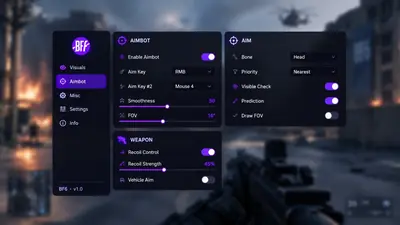
Tune smoothing, bones, FOV, and max distance on the aim tab. Cap ESP distance before 64-player clutter takes over. Confirm status on cheatbattlefield.com before you queue.
Product Overview
At a glance
Key capabilities
The short list for Battlefield 6 Cheats, before the full module list.
Another 8 options are in the full list below.
Overview
Battlefield 6 cheat suite
How the listed modules and the status banner fit a Battlefield 6 match.
This package targets large 64-player fights: cap ESP distance before the screen fills, use skeletons to read prone players behind rubble, and widen awareness with radar before you lean on aim smoothing.
Cloud DMA is required on the catalog stack. HVCI, Core Isolation, TPM, and Secure Boot stay on. After a patch, read the banner on cheatbattlefield.com before you queue.
Each menu group covers one job: aim smoothing and bones, player ESP with distance caps, skeleton and wallhack visuals, radar, recoil layers, and saved config profiles.
Configuration and support
The menu turns each option on or off and shows the settings that option has. Setup notes ship in the portal. A patch can change which settings remain.
Checkout and delivery
The checkout page confirms the available access options. The portal provides delivery instructions after purchase. Read the status banner before a session.
Updates and compatibility
Compatibility can shift after a Battlefield 6 update or a Javelin change. Check the game version and the banner on cheatbattlefield.com before you launch.
Modules
What's included
The full option list for Battlefield 6 Cheats. Each line can be switched in the menu.
- Aimbot with smoothing
- Bone selection (head, neck, body)
- FOV and distance limits
- Visible check
- Player ESP
- Skeleton ESP
- Wallhack
- Name and distance labels
- Health bar option
- Radar overlay
- No recoil layers
- Stream-proof mode
- Config save, load, and share
- Hotkey toggles
- Vehicle listed in catalog features
Experience
Menu layers · After checkout
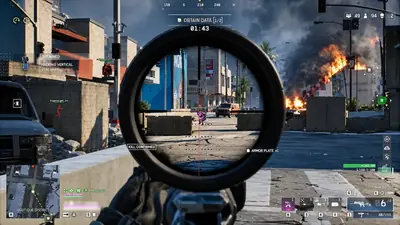
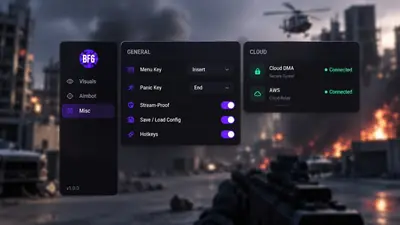
The shots above show menu layout examples. Notes below describe aim, visuals, and radar groups—and how portal access opens after checkout.
In-game layers
- Layer A
Match overlays
Scoped lane with skeleton ESP, names, and distance readouts in Battlefield 6.
- Layer B
Aimbot menu
Aim keys, bone target, smoothing, FOV, and visibility checks on the aimbot tab.
- Layer C
Misc & cloud
Hotkeys, stream-proof mode, config saves, and Cloud DMA connection status.
More products
Pairs well with
Utilities sold beside the cheat. Each one keeps a separate page.
- HWID Spoofer After a hardware flag, this license rewrites disk serials. It also rewrites MAC addresses, GPU IDs, and related fingerprints. Trace cleanup is in the same license. View details: HWID Spoofer
- Cloud DMA Cloud DMA may require GREENWARD, Static Server and AWS as separate purchases. Check the full requirements and current price at checkout. View details: Cloud DMA
- Skin Changer A small client paints premium weapon skins on your screen. Outfits and knife variants are included, across the major titles it lists. View details: Skin Changer
FAQ
Questions about this page
Answers for this page. The FAQ page holds the rest.
Blog
Related guides
Filter by topic to find setup guides, feature deep-dives, and patch-day notes.
A practical checklist for buying Battlefield 6 cheats: Windows settings, Cloud DMA, delivery, and what the product page should explain.
A plain explanation of Javelin on Battlefield 6, how it differs from older EA titles, and why it matters for third-party tools.
Why distance caps matter when 64 players spread across open ground, and how boxes, names, and health tags stay readable.
How smoothing, FOV, and bone selection keep aim useful from CQB to open lanes without obvious snaps.
When a wider radar helps on flanking routes, and when the default minimap is enough.
How to check TPM 2.0 and Secure Boot in Windows, turn them on in BIOS, and confirm the settings the cheat catalog expects.
Battlefield 6 community forum
Read discussion
Forum: Archived, read-only threads on loader setup, ESP configs, patch status, and HWID notes. Replies are closed.
- Gameplay Questions ESP max distance on Conquest feels like too many boxes Full map Conquest with ESP maxed paints the whole lane. Curious what others cap distance at before the screen turns into spaghetti.
- Gameplay Questions Radar overlay vs minimap for reading flank rotations Trying to decide if the cheat radar is worth the corner space when the minimap already shows caps. Squad play with constant flanks.
- Features & Customization Aim smoothing at long range or does it look like snap? Soft aim feels fine in CQB but at range even low smoothing looks like a snap on killcam replay. Looking for sane curves.
- Features & Customization Skeleton ESP on prone players behind low walls Skeleton lines peek through crate-height cover when someone is prone. Not sure if that is WAI or a bone filter setting.